
Now in beta · macOS · Windows · Linux
Zero server install · just SSH

Your remote server,
finally visual.

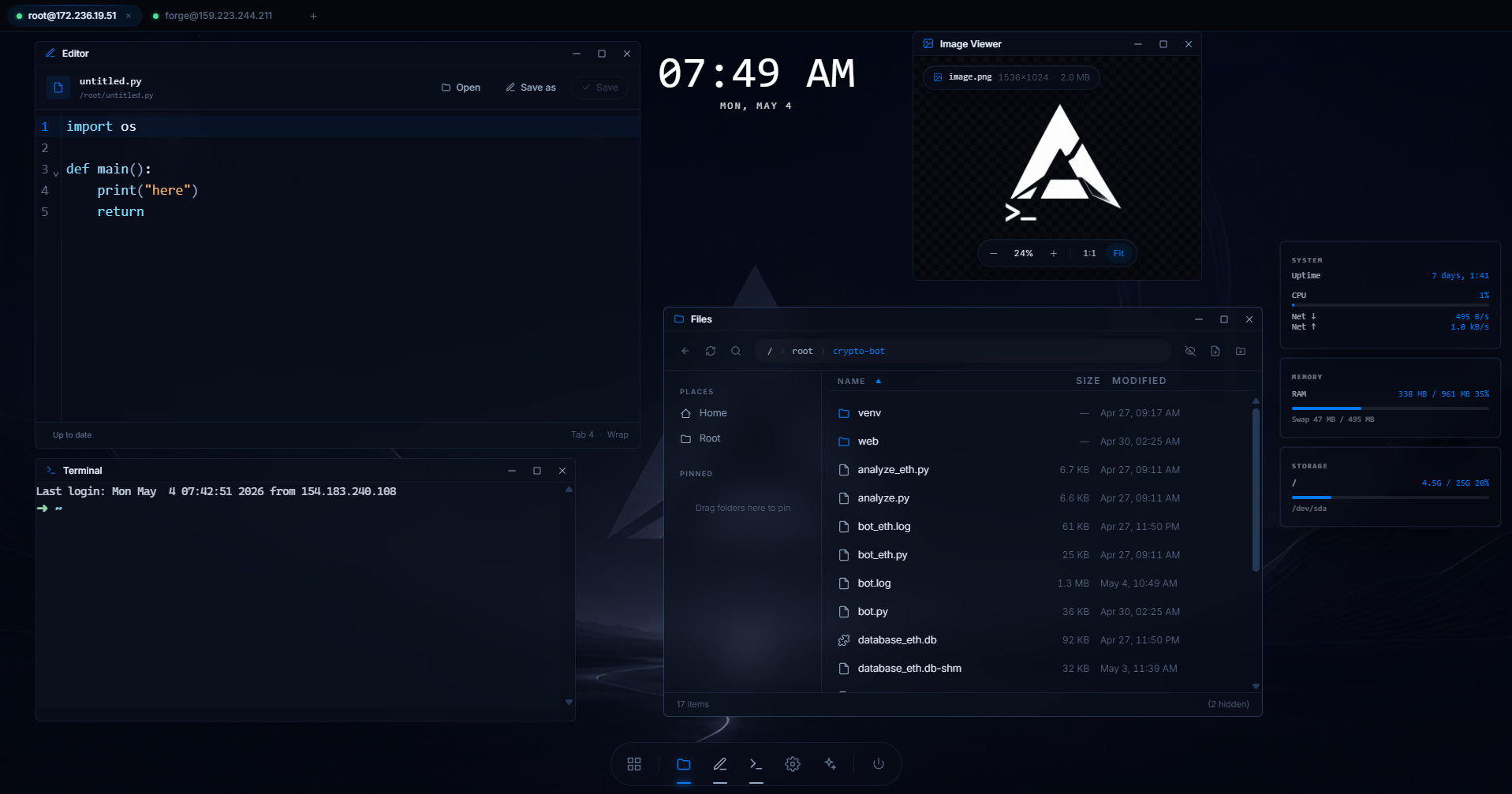
Axion SSH replaces the terminal with a desktop‑OS‑like environment. Connect to any Linux host and work in real windows: file explorer, terminal, editor, plugins, widgets, all over real SSH/SFTP, with nothing to install on the server.

Waitlist perk — exclusive launch offer for everyone on the list.

No spam, one email when Axion SSH launches.

root@prod-eu-1
deploy@homelab
New tab
⌘K
Terminal
root@prod-eu-1:~# uptime
 13:42:08 up 47 days, 3:21, 2 users, load 0.18, 0.21, 0.14
root@prod-eu-1:~# systemctl status nginx
 ● nginx.service - A high performance web server
    Active: active (running) since Mon 2026-04-21
root@prod-eu-1:~# tail -f /var/log/app/access.log
Files · /var/www
app
dir
config
dir
public
dir
storage
dir
.env
1.4 KB
composer.json
3.2 KB
README.md
8.1 KB
System live
CPU 38%
MEM 4.9 / 8 GB
DISK 142 / 200 GB

Built for developers, sysadmins, and homelab tinkerers

Features

A real desktop. Over real SSH.

No virtualization, no agents. Axion talks SSH and SFTP directly to your host, and gives you a full window manager on top.

Window manager

Drag, snap, resize, minimize, maximize. Real z‑order, focus, and per‑window error boundaries so one bad app can't crash the desktop.

Multi‑tab sessions

Each tab is its own remote desktop with independent windows, widgets, and history. Switch hosts without losing context.

Built‑in apps

A polished SFTP file explorer, an xterm.js terminal with PTY, a CodeMirror editor with 11+ languages, and an image viewer, all in one.

Plugins & widgets

Extend Axion with HTML/CSS/JS. Plugins run as windows, widgets pin to the wallpaper. Everything sandboxed, every capability opt‑in.

Zero server install

No agent, no daemon, no sidecar to install on your host. Axion speaks plain SSH and SFTP, exactly like your terminal does — if sshd is running, you're ready.

Saved connections

Quick‑connect from a saved list, share connection profiles between devices, and keep credentials encrypted at rest.

How it works

From SSH key to full desktop, in under a minute.

01

Install Axion

Download the desktop app for macOS, Windows or Linux. ~25 MB, no agent on the server.

02

Add a connection

Paste a host or import from your SSH config. Credentials sit in the OS keyring, never in plaintext.

03

Open the desktop

Files, terminal, editor and your widgets boot in seconds. Pin what you use, install plugins for the rest.

Extensions

A growing library of plugins & widgets.

Each extension lives on GitHub and runs sandboxed in your Axion desktop. Install in one click, fork freely, or build your own.

FAQ

Questions, answered.

Do I need to install anything on my server?

No. Axion SSH runs entirely on your local machine and talks to your server using standard SSH and SFTP, exactly like a normal terminal would. There is no agent, daemon, helper binary or sidecar to install on the host. If sshd is running, you're ready.

When is Axion SSH launching?

Axion is in active development. Join the waitlist and we'll email you the moment beta invites and downloads go out, ahead of the public launch. Waitlist members also get an exclusive launch offer.

Which platforms will be supported?

Axion SSH ships for macOS (Intel + Apple Silicon), Windows 10/11, and most modern Linux distributions. The remote host can be any Linux box with sshd running, no agent required.

Where will my credentials live?

In your OS keyring (Keychain on macOS, DPAPI on Windows, libsecret on Linux). Axion never stores plaintext passwords or keys, and we don't proxy your traffic; connections go directly from your machine to your server.

Will there be a free version?

Yes. The core terminal and file explorer will be free. Pricing for the full app suite, plugins and widgets will be announced closer to launch, waitlist members hear first and get an exclusive launch offer.

Stop juggling tabs of ssh commands.

Give your servers a face — no agent, no install, just SSH. Join the waitlist for an exclusive launch offer.